


Business Consultant WordPress Theme Tips for Winning More Clients

Getting new clients as a consultant isn't just about being good at what you do. Plenty of skilled consultants struggle to fill their calendar simply because their website doesn't do a good job of convincing people to reach out. On the flip side, some consultants with a decent-but-not-amazing offer still win clients regularly because their site builds trust and makes it easy to say yes. A Business Consultant WordPress Theme helps create a professional, conversion-focused website with service pages, case studies, client testimonials, clear call-to-action buttons, and contact forms, making it easier to build credibility, generate quality leads, and convert visitors into long-term clients.
A big part of that comes down to how you set up and use your WordPress theme. It's not just about picking something that looks nice in a preview. It's about actually configuring it in a way that turns visitors into paying clients. Let's go through some practical tips that make a real difference.
Start With the First Impression Your Homepage Gives
Your homepage usually gets the most traffic, so it needs to do the heaviest lifting.
Say What You Do in One Glance
Visitors shouldn't have to scroll and dig to figure out what you offer. Within a few seconds, they should understand who you help and what problem you solve. A clear, simple headline near the top does most of this job.
Avoid Vague Corporate Language
Phrases like "innovative solutions for tomorrow's businesses" sound nice but tell the visitor absolutely nothing. Be specific. Say exactly what kind of consulting you do and who it's for.
Use a Strong, Visible Call-to-Action
Whether it's "Book a Free Call" or "Get a Quote," make sure this button is easy to spot without hunting for it. Repeat it more than once as visitors scroll down the page.
Structure Your Service Pages So They Actually Convert
Break Services Into Clear Categories
If you offer more than one type of consulting, don't cram it all into one page. Separate pages for each service make it easier for visitors to find exactly what they're looking for, and it also helps with search engine visibility.
Explain the Outcome, Not Just the Process
A lot of consultant websites describe what they do in technical terms but never explain what the client actually gets out of it. Instead of just saying "we offer financial audits," explain what that leads to - clearer numbers, fewer surprises, better decision-making.
Add a Simple Next Step at the End of Every Page
Every service page should end with some kind of action - a contact form, a booking link, or at minimum a clear next step. Don't leave visitors wondering what to do after they finish reading.
Read More: Powerful Financial Consulting WordPress Theme for Growth
Build Trust Through Design, Not Just Words
Showcase Real Client Results
If you can share numbers, timelines, or specific improvements from past clients, do it. People trust proof far more than promises. Even a short case study with a before-and-after can be very convincing.
Add Testimonials Near Decision Points
Rather than dumping all your testimonials on a separate page nobody visits, place a few strategically - right before a pricing section or contact form, where people are deciding whether to commit.
Show Your Face and Your Team
Consulting is a personal service. People want to know who they'll be working with. A theme that supports proper team bios with photos helps visitors feel like they're dealing with real humans, not a faceless company.
Technical Tweaks That Quietly Help You Win More Clients
Speed Up Your Website
A slow website frustrates visitors before they even get to your offer. Compress your images, avoid piling on too many plugins, and pick a theme that's coded efficiently rather than one stuffed with unnecessary features.
Make Sure It Works Well on Mobile
Test your site on your own phone regularly. Buttons that are too small, text that overlaps, or forms that don't work properly on mobile can quietly cost you leads you'll never even know you lost.
Keep Navigation Simple
Don't overload your menu with ten different links. Stick to the essentials - services, about, testimonials or case studies, and contact. Simpler navigation means visitors are less likely to get lost or give up.
Use Forms That Ask the Right Questions
Instead of just a basic "Name, Email, Message" form, consider adding a question or two about the visitor's specific needs or budget. This helps you qualify leads before you even respond, saving time on calls that were never going to go anywhere.
Keep Your Content Fresh
Add a Blog or Resource Section
Publishing helpful articles related to your consulting niche does two things - it helps with search engine rankings over time, and it shows potential clients that you actually know your stuff before they even talk to you.
Update Old Pages Regularly
Outdated statistics, old testimonials, or references to services you no longer offer can quietly hurt your credibility. Set a reminder every few months to review and refresh your key pages.
Common Pitfalls That Cost Consultants, Clients
- Making visitors dig through multiple pages just to find a contact button
- Using stock photos that feel generic and impersonal
- Overloading pages with jargon instead of plain, clear language
- Ignoring page speed and mobile performance until it's too late
Small fixes in these areas often lead to noticeably better results without a full website overhaul.
Conclusion
Winning more clients as a consultant often comes down to small, deliberate choices in how your website is built and structured, rather than one big dramatic change. A clear homepage, well-organized service pages, visible proof of your results, and a fast, mobile-friendly site all work together to build trust before a client ever picks up the phone. If you're looking to upgrade your setup, exploring premium WordPress templates built specifically for consultants can give you a strong foundation to work from, saving you time while still covering all the features that actually help convert visitors into clients.
Frequently Asked Questions
1. What's the single biggest mistake consultants make on their websites?
Being too vague about what they actually do. Visitors should understand your services within a few seconds, not after digging through several pages.
2. How many testimonials should I include on my site?
Quality matters more than quantity. A handful of specific, detailed testimonials placed near your contact or pricing sections usually works better than a long list of generic praise.
3. Does page speed really affect whether I get more clients?
Yes. A slow site frustrates visitors and often causes them to leave before they even see your offer, regardless of how good your services actually are.
4. Should I list my prices on my website?
It depends on your business model. Some consultants prefer to discuss pricing on a call, while others find that transparent pricing builds trust and filters out unqualified leads early on.
5. How often should I update my website content?
A good habit is reviewing your key pages every few months to update outdated information, refresh testimonials, and make sure everything still reflects your current services accurately.
Categorieën
Read More
When shopping for phone or gaming accessories, it's tempting to choose the cheapest screen shield available. After all, every screen shield looks similar at first glance, and saving a few dollars seems like a smart decision. However, what many people don't realize is that a low-quality screen shield can end up costing much more in the long run. Whether you're protecting your smartphone,...

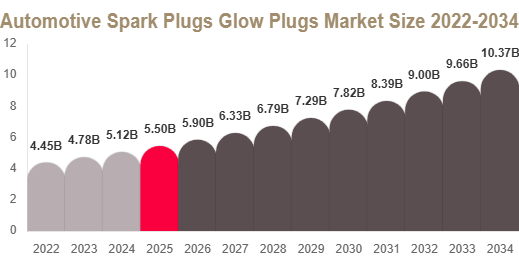
Automotive Spark Plugs Glow Plugs Market Automotive Spark Plugs Glow Plugs Market Size The Automotive Spark Plugs Glow Plugs market was valued at USD 5.6 billion in 2025 and is projected to reach USD 5.9 billion in 2026. By 2034, the market is expected to reach USD 10.4 billion, expanding at a CAGR of 7.3% during 2025–2034. Get Your Sample Report Here:...
Raymond Realty Mahim brings innovative urban residential options to the city of Mumbai. Raymond Realty developed this project in a prime city location with contemporary architectural design elements and efficient spatial organization and high-end residential amenities. The real estate market in Raymond Realty Mahim demonstrates superior value because it combines residential comfort with...

The Ultimate Guide to Jalwa Game, Jalwa Login, and Jalwa Game Login The online gaming landscape in India is experiencing remarkable growth, with platforms like Jalwa Game emerging as popular destinations for entertainment and rewards. Whether you are a newcomer or a seasoned player, understanding the platform's features and how to access it is essential. This comprehensive guide...

" All Weather Tire Market Summary: According to the latest report published by Data Bridge Market Research, the All Weather Tire Market CAGR Value Global All Weather Tire Market was valued at USD 171.79 billion in 2021 and is expected to reach USD 250.93 billion by 2029, registering a CAGR of 4.30% during the forecast period of 2022-2029. Market definition mentioned in this All...