Claude Design vs. Sivi AI: Why Generating HTML Isn't the Same as Generating a Design

A few weeks ago, a founder was pitching her AI design startup, Sivi, to an investor. She explained that Sivi's underlying model produces free-form, editable, on-brand designs in over 70 languages. The investor pushed back: "Claude Design already does that." To prove it, she pulled up a deck she'd recently built with Anthropic's Claude Design, clicked into a headline, and edited the text right there in the interface. Editable. On-brand. Done, she said.

Then came the real test. The founder asked her to nudge that same headline two pixels upward.
She couldn't do it — not from lack of skill, but because Claude Design's output simply isn't built to work that way. That one small drag exposed the real difference between a large language model that writes HTML and a purpose-built design model that manipulates a layered canvas. This piece digs into that difference, why it actually matters for anyone choosing a tool, and where each product genuinely shines.
The Core Distinction
In short: Claude Design produces a website artifact — code that a browser renders. Sivi AI produces a design file — layers positioned on a canvas with real coordinates. One is built around a tree of HTML <div> elements; the other is built around free-floating pixel layers. That single architectural choice determines everything you can and can't do once the first draft is generated.
Side-by-Side: What Each Tool Actually Does
| Capability | Claude Design | Sivi AI |
|---|---|---|
| Underlying model | An LLM (current-generation Claude Opus) | A purpose-built "Large Design Model" (Gen-2.7) |
| Output format | Live HTML, CSS, and JavaScript | A layered, vector-based design file |
| Basic building block | A <div> inside a document tree |
An individual layer with x/y position, rotation, and z-index |
| Freely repositioning elements | No — adjustments happen via chat, inline edits, or sliders | Yes — drag anything anywhere |
| Resizing or rotating layers | Constrained, since these are code properties | Yes, directly on the canvas |
| Cropping or panning an image | Not supported | Yes, with focal-point control |
| Adding new elements post-generation | No — you re-prompt and regenerate | Yes, from a toolbar |
| Fonts | Limited to your design system plus available web fonts | Upload and apply any brand font |
| Image masking | Basic shapes only | Any custom shape or path |
| Resizing across aspect ratios | Standard responsive web reflow | The model re-lays out every layer for the new dimensions |
| Best suited for | Websites, landing pages, dashboards, prototypes, slide decks | Ads, social posts, posters, banners, thumbnails |
| Comparable tools | Framer, Webflow | Design/template tools like Figma or Canva |
| Editing approach | Chat plus inline comments, sliders, and a Canva handoff (for adding elements, not editing existing HTML) | Direct manipulation of layers on the canvas |
| Availability | Bundled into Claude Pro, Max, Team, and Enterprise plans as a research preview | Free tier plus paid plans, available via web app, REST API, and an embeddable SDK |
| Export formats | PDF, PPTX, HTML, ZIP, or handoff to Claude Code | JPG, PNG, SVG, HTML, PDF |
What Claude Design Generates
Claude Design produces fully responsive HTML documents. Under the hood, it's Claude — a large language model — writing actual code: sections, flex containers, utility classes, and inline styling that a browser then renders into something that looks designed. Anthropic released it as a research preview in April 2026, and it consistently outputs live, functional HTML rather than static images or layered design files.
That foundation makes it genuinely strong for what it's built for. It has a chat interface alongside a live canvas preview, it can reference an existing codebase or design system to stay on-brand, and it hands off cleanly to Claude Code when you're ready to ship. For a landing page, a dashboard, an app prototype, or a pitch deck, it's arguably one of the best tools available right now.
But the code-first foundation creates real limits for graphic-design work specifically:
- No free movement. Every element lives inside a parent
<div>. There's no x/y coordinate to grab — shifting a headline means restructuring the underlying HTML, not dragging a layer. - No direct resizing or rotation. Resize handles don't exist the way they do on a canvas layer; width, height, and rotation are code properties, not draggable handles.
- No toolbar for adding elements. Want to drop in a new shape, icon, or text box? You go back to the prompt and regenerate the whole document.
- No image cropping or panning. An image is just an
<img>tag with a source — there's no crop box or focal-point selector. - Bounded typography. You're limited to your configured design-system fonts plus available web fonts, not a full foundry catalog per element.
- Placement can clip. When fitting an object into a container, edges often crop hard unless the subject is already centered, and masking only supports a handful of basic shapes.
None of this reflects poorly on the model's intelligence — it's simply the wrong primitive for fixed-canvas graphic work where a product photo needs to overlap text at a 12-degree tilt.
What Sivi AI Generates
Sivi runs on what it calls a Large Design Model, or LDM — a model purpose-built for design the way an LLM is purpose-built for language. Instead of predicting the next word in a sentence, it predicts the next design element: its type, position, size, rotation, color, font, and shadow, composed according to design principles like hierarchy and contrast, then rendered as an editable, layered file rather than a document.
On Sivi's layered canvas, you can move any element anywhere, resize and rotate layers freely, crop and pan images to a focal point, upload custom brand fonts, mask with any shape (not just circles and rectangles), and resize a design from one aspect ratio to another while the model automatically re-lays every layer to fit. It also composes layouts across more than 70 languages, adjusting for local typography and hierarchy rather than simply translating text in place.
Pricing: Different Models Entirely
Claude Design isn't sold as a standalone product — it's bundled into Claude's existing subscription tiers, starting around $17–20/month for Pro. Because it runs on Claude's Opus model and reprocesses the entire document on every iteration, design work draws from your general Claude usage allowance rather than a dedicated design budget.
Sivi AI uses a credits system instead — one universal unit spent on designs, copy, and images. A typical prompt generating four design variations costs roughly 4–5 credits, and the cost is shown before each action. Its free tier includes 12 credits a month and 100MB of storage with no card required. Paid tiers scale from a $16/month Plus plan (100 credits, 4GB storage, custom fonts, private generation, API access) up through Pro and Power plans, with a custom Enterprise tier offering SSO, white-labeling, and dedicated support. Annual billing saves roughly 20%, credits reset each cycle without rolling over, and failed generations are automatically refunded.
For teams whose output is mostly web pages and decks, Claude Design adds no incremental cost. For teams producing graphic-design assets — ads, social posts, banners — at any real volume, a credit-based model tends to be more predictable, since you can see the exact cost per run instead of drawing down a shared AI budget every time you nudge a layer.
So Which One Should You Use?
Reach for Claude Design when the deliverable is a web artifact: a site, landing page, prototype, or slide deck. Within that lane, it's one of the strongest tools available, especially if you're already working inside the Claude ecosystem.
Reach for Sivi AI when the deliverable lives on a fixed canvas and needs free-form, layered, pixel-level control: ads, social graphics, posters, banners, thumbnails, emails — or when you want that kind of generation embedded directly into your own product via API.
Plenty of teams end up using both, because they're not really competing with each other — one builds websites, the other builds graphics. The investor in that opening story wasn't wrong to be impressed by Claude Design; it genuinely turns a sentence into a working, on-brand webpage. The mistake was assuming that because the output looked like graphic design, the tool could do graphic design. It can't, and no amount of clever prompting changes that, because the constraint isn't the model's intelligence — it's the foundation underneath it. An LLM writes code. Code renders into a document. A document is not a free-form design.
The whole distinction comes down to one drag. Edit the text in either tool and both will impress you. Try to move that same element two pixels, and the categories split immediately: a document reflows, while a true design file stays exactly where you put it.
Categories
Read More
React native App Development Services from Agicent ? We used to use various flavors of Javascript long before react native came into being and once it came, we went all big on it. There were times when React-native and other cross platform technologies (like Flutter, Ionic, QT) were only good for creating App MVPs and had a lot of issues such as integration with third party libraries, with...

Architects in Noida: Creating Innovative Spaces with Expert Design Solutions Noida has emerged as one of the fastest-growing urban centers in North India, known for its modern infrastructure, premium residential developments, commercial hubs, and evolving lifestyle preferences. As the city continues to expand, the demand for professional architects in Noida has increased significantly. Whether...

Players of Call of Duty: Mobile have been encountering a frustrating desync glitch causing certain enemies to become invincible, disrupting gameplay and causing confusion during battles. Since the launch of Season 8: The Forge, which introduced the Highrise map, a new multiplayer mode, a fresh perk, and two new weapons, many gamers have enjoyed the fresh content. However, some have faced an...

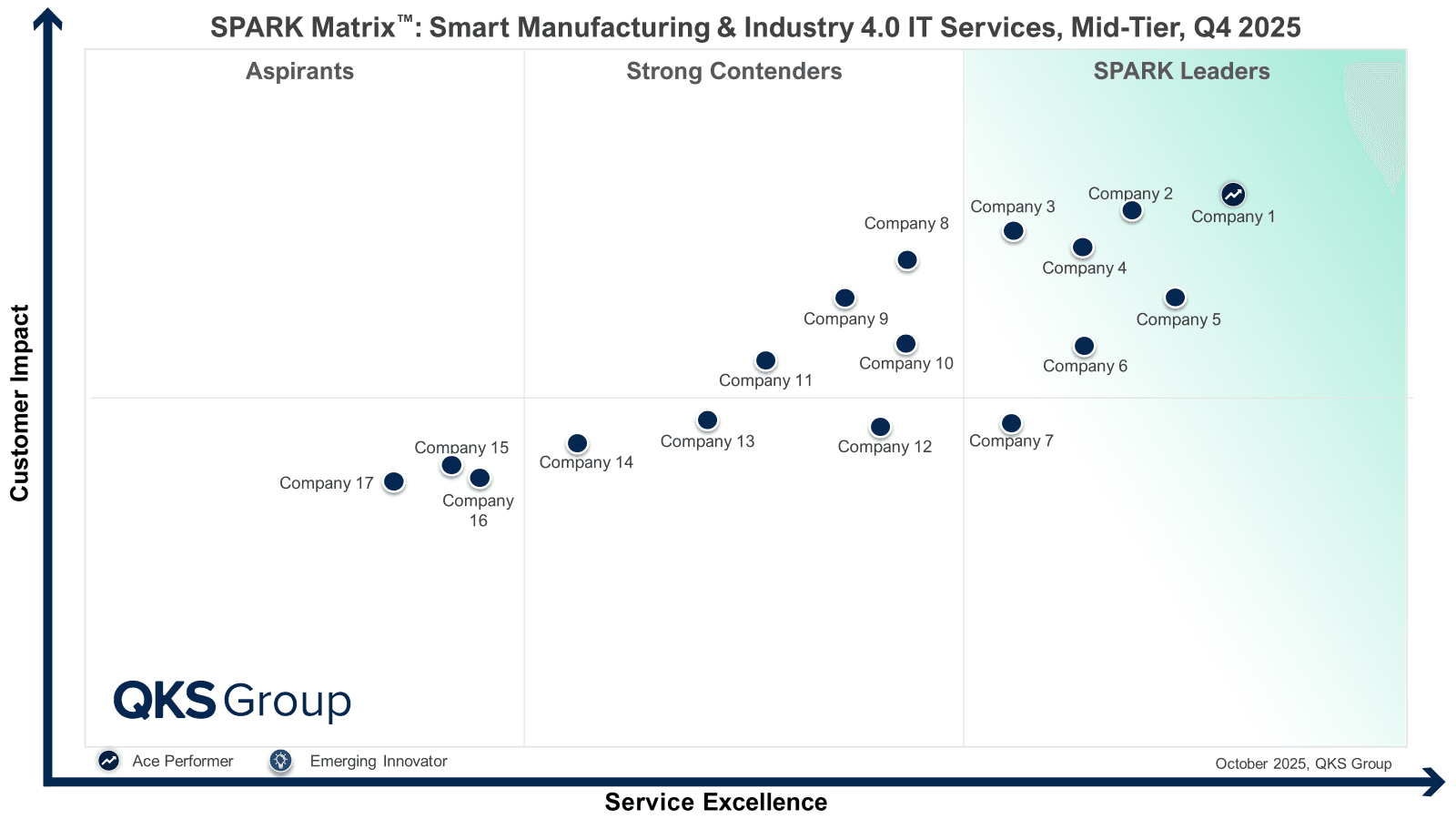
Introduction Manufacturing is entering a decisive decade. Rising cost pressures, volatile supply chains, talent shortages, and increasing customer expectations are forcing manufacturers to rethink how they design, produce, and deliver products. For mid-market manufacturers, the challenge is even sharper—how to modernize operations without the budget flexibility or risk tolerance of large...
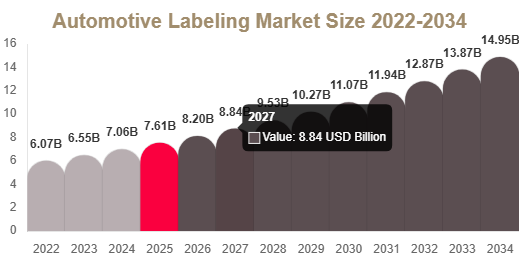
Automotive Labeling Market Overview The automotive labeling market is growing steadily due to increasing demand for vehicle identification, regulatory compliance, traceability, and advanced manufacturing processes in the automotive industry. Automotive labels are essential for providing safety information, barcodes, VIN tracking, and component identification across the vehicle lifecycle....