


Maintenance Tips After CCTV Installation: Keeping Your System Effective
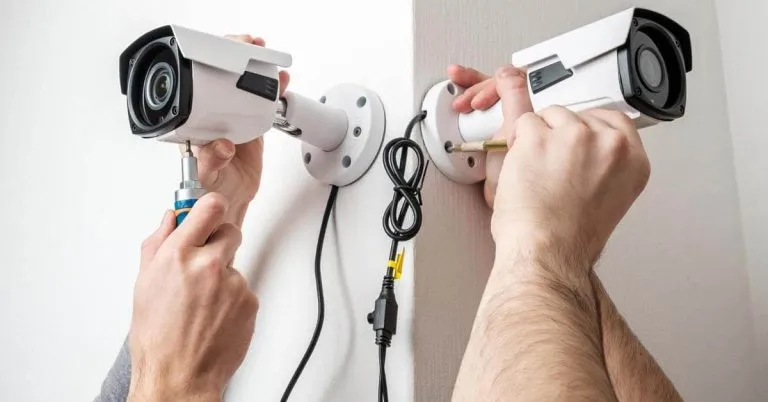
Installing a surveillance system is a major step toward improving property security, but the work does not end once the cameras are mounted and recording. Regular upkeep is essential to ensure your CCTV system continues to perform efficiently and provide reliable protection. Without proper maintenance, issues such as blurry footage, storage failures, network interruptions, and hardware damage can reduce effectiveness. For homeowners and business owners across the UK, understanding how to maintain security cameras after installation ensures long-term performance, clear video evidence, and uninterrupted monitoring.
A well-maintained system not only deters criminal activity but also protects your investment. By following practical maintenance strategies, you can keep your surveillance equipment functioning at its highest standard year after year.
Why CCTV Maintenance Is Important
After completing a CCTV installation, many property owners assume the system will run flawlessly without attention. However, environmental exposure, software updates, and hardware wear can gradually impact performance. Dust accumulation on lenses, loose cables, outdated firmware, or failing hard drives can compromise recording quality and reliability.
Routine maintenance ensures cameras capture clear images, recording devices store footage properly, and remote access remains secure. It also reduces the likelihood of unexpected breakdowns, which can be costly and leave your property vulnerable.
Regular Visual Inspections
One of the simplest yet most effective maintenance practices is performing regular visual inspections of your cameras and equipment.
Checking Camera Position and Stability
Over time, cameras may shift due to weather conditions, accidental contact, or vibrations. Even slight misalignment can create blind spots or reduce coverage of key entry points. Inspect each camera to ensure it remains securely mounted and positioned correctly.
Confirm that the viewing angle still covers entrances, driveways, hallways, or storage areas as intended. Adjust positioning if necessary to maintain optimal surveillance coverage.
Inspecting for Physical Damage
Outdoor cameras are exposed to rain, wind, dust, and temperature fluctuations. Check for cracks in housings, water ingress, or signs of corrosion. Damaged components should be repaired or replaced promptly to avoid further complications.
Cables and connectors should also be examined for wear or tampering. Securing exposed wiring helps maintain both performance and safety.
Cleaning Camera Lenses and Housings
Clear video footage depends on clean lenses. Dirt, spider webs, smudges, and debris can significantly reduce image clarity.
Cleaning Procedures
Use a soft microfiber cloth and gentle cleaning solution to wipe camera lenses. Avoid abrasive materials that could scratch the surface. For outdoor cameras, check and clean protective covers regularly.
Cleaning should be done at least every few months, or more frequently in dusty or high-pollution areas. Clear lenses ensure sharp video quality and accurate facial or vehicle identification.
Testing Video Quality and Recording
Routine system checks confirm that your cameras are recording correctly and storing footage as expected.
Reviewing Live Feeds
Access each camera’s live feed to verify clarity, brightness, and focus. Ensure night vision features operate properly in low-light conditions. If footage appears blurry or distorted, adjustments may be needed.
Test cameras during different times of the day to ensure consistent performance under varying lighting conditions.
Checking Playback and Storage
Review recorded footage periodically to confirm the DVR or NVR is storing data correctly. Verify that storage capacity aligns with your desired retention period. If footage is being overwritten too quickly, you may need additional storage.
Hard drives should be monitored for unusual noises or performance issues, as these may indicate impending failure.
Updating Firmware and Software
Modern surveillance systems rely on software to function securely and efficiently. Manufacturers regularly release firmware updates to improve performance and patch security vulnerabilities.
Keeping Systems Updated
Check for firmware updates through your camera management app or manufacturer website. Installing updates ensures your system benefits from enhanced features, improved stability, and stronger cybersecurity.
Neglecting updates may leave your system exposed to hacking attempts or compatibility issues with smart home devices.
Ensuring Network Security and Connectivity
Many CCTV systems use internet connectivity for remote access and cloud storage. Maintaining network security is critical for protecting video data.
Testing Internet Stability
Verify that your Wi-Fi or wired connection remains stable. Weak signals can interrupt live feeds and prevent notifications from reaching your device. If connectivity problems occur, consider upgrading your router or adding signal boosters.
Strengthening Cybersecurity
Change default passwords immediately after installation and use strong, unique credentials. Enable two-factor authentication where available. Regularly review connected devices on your network to ensure only authorised users have access.
Cybersecurity is a vital part of maintaining a modern surveillance system.
Checking Power Supply and Backup Systems
Reliable power is essential for continuous monitoring. Power interruptions can result in lost footage and reduced security.
Inspecting Power Connections
Ensure that power cables are secure and undamaged. For systems with backup batteries or uninterrupted power supplies, test these components periodically to confirm they function properly.
Backup systems should activate automatically during outages, allowing cameras to continue recording without disruption.
Seasonal Maintenance Considerations
In the UK, changing weather conditions can impact CCTV performance. Seasonal checks help prevent weather-related damage.
Winter Precautions
Cold temperatures and frost can affect camera housings and wiring. Check outdoor units for ice buildup and ensure protective casings remain intact.
Summer Checks
During warmer months, inspect cameras for overheating or sun glare that may distort footage. Proper shading or repositioning can improve image quality.
Adjusting maintenance routines according to seasonal conditions ensures consistent reliability.
Reviewing Camera Coverage and Security Needs
Security requirements may change over time. Renovations, landscaping, or new entry points can create areas not covered by existing cameras.
Updating Camera Placement
Reassess coverage annually to ensure all vulnerable areas are monitored. Adding additional cameras or upgrading to higher-resolution models may be necessary as risks evolve.
Regular evaluation keeps your security system aligned with your property’s needs.
Scheduling Professional Maintenance
While many maintenance tasks can be handled independently, professional servicing adds an extra layer of assurance. Companies such as sahisecure volt offer system inspections, diagnostics, and preventive maintenance services.
Professional technicians can identify hidden issues, test recording equipment thoroughly, and ensure compliance with current security standards. Scheduled servicing reduces the likelihood of unexpected breakdowns and extends the lifespan of your equipment.
Maintaining Compliance and Data Protection
UK property owners must handle recorded footage responsibly. Regularly review data retention policies and ensure storage practices align with legal guidelines.
Secure storage, limited access to footage, and proper signage indicating CCTV use are essential for compliance. Maintaining these standards protects both property owners and recorded individuals.
Final Thoughts on CCTV Maintenance
CCTV installation is only the beginning of effective property protection. Ongoing maintenance ensures your system continues to deliver high-quality surveillance, reliable recording, and secure remote access. From cleaning lenses and updating software to checking storage capacity and strengthening network security, each maintenance step contributes to overall performance.
A proactive approach reduces the risk of system failure and enhances long-term reliability. By performing regular inspections and seeking professional support when needed, UK homeowners and businesses can keep their surveillance systems operating efficiently and effectively.
Proper maintenance transforms your CCTV system from a simple monitoring tool into a dependable, long-term security solution that protects your property year-round.
Категории
Больше
In the ever-shifting world of virtual gaming, the online slot has moved beyond its mechanical roots. No longer just a digital mimic of the classic "one-armed bandit", the rajapg88 odern online slot is a fusion of art and math that sits at the confluence of storytelling and software. As we explore 2026, the online slot has become a globally dominant phenomenon, thrilling...

Introduction to RebirthRO RebirthRO is a well-established private Ragnarok Online server that delivers an exciting blend of classic gameplay and modern improvements. Designed for both veteran players and newcomers, it provides a stable and enjoyable gaming environment where players can relive the nostalgic charm of Ragnarok Online while benefiting from updated features and active community...
If you are looking for the perfect Caribbean getaway, a Providenciales fully furnished vacation villa offers everything you need for a relaxing and memorable stay. Located in the breathtaking Turks and Caicos Islands, Providenciales is a dream destination known for its crystal-clear turquoise waters, white sandy beaches, warm tropical climate, and luxurious accommodations. Whether you are...

The best Mumbai Call Girls is available 24/7 for incall and outcall Call Girls in Mumbai. callgirlsmumbai.net provides you with Instant booking. Premium Mumbai call girls service available 24/7 in Mumbai. Book high profile, independent, Russian and college call girls with full privacy. Book Mumbai Call Girls for elite VIP dates at 5-star hotels. Check out Call Girls in Mumbai with Verified...
En el mundo de los metales preciosos, la reputación importa. Mucho. LA FONTAINE ha construido su posición en Uruguay al comprender cómo la gente realmente aborda el oro, no solo como un lujo, sino también como un valor Compra y venta de oro en Uruguay Está influenciado por los precios globales, sí, pero también por el conocimiento y los tiempos...