Season 1 – The Crimson Plague: Territory & Influence Guide
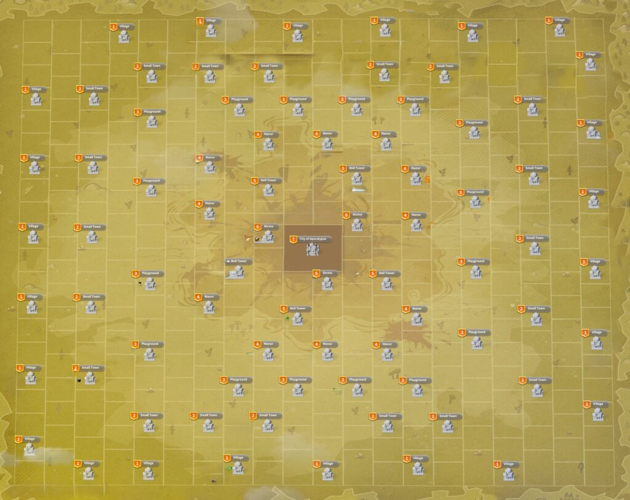
As Season 1 – The Crimson Plague begins, every alliance is relocated to the edge of the server map, forming a single hive of allied bases. The map expands significantly and introduces two types of capturable territories: Military Strongholds and Cities. The Capitol, renamed the City of Apocalypse, remains unchanged. All cities and strongholds start unowned, so alliances must rebuild their territory from scratch.
Influence Points and Territory Value
Victory in Season 1 is determined by Influence Points, which an alliance earns only while holding territories. Strongholds provide modest influence, Cities grant substantially more, and capturing Cities in other Warzones yields the largest amounts. Influence per City level is as follows: Level 1 = 100k, Level 2 = 200k, Level 3 = 300k, Level 4 = 400k, Level 5 = 500k, Level 6 = 1M. Losing a territory immediately forfeits its ongoing influence contribution.
Territory Capture Rules
Capturing begins in an alliance's own Warzone. Military Strongholds become available on Day 3 of Week 1, and Cities on Day 4 of Week 1. An alliance can capture up to 2 Strongholds and up to 2 Cities per day—these limits are separate and apply globally once cross-Warzone operations open. To declare war on a City, the alliance must have a continuous territory connection via owned Strongholds. If no territory exists, the first step is capturing a Level 1 Stronghold. War declarations last one hour, and an alliance can declare on only one City at a time.
The initial cap for owned Strongholds is 3. Each captured City of Level 1–5 increases this cap by +1, and each Level 6 City increases it by +2. If a city loss reduces the cap below the number of Strongholds currently held, the excess Strongholds are kept but no additional ones can be captured until the balance is restored. Captured Strongholds enter a 36‑hour protection period. Captured Cities are protected for 7 days (until the next Declaration Day server time at 12:00). If an alliance abandons a City, it cannot recapture it for 5 days, though other alliances may do so sooner. Mail logs every capture or abandonment, which is the only reliable way to track daily capture counts.
Cross-Warzone Expansion
From Day 2 of Week 3, alliances can place up to 4 Alliance Outposts, with a maximum of one per Warzone. An outpost cannot be removed and must be built with reinforcements (it is vulnerable during construction but can be rebuilt if destroyed). Once built, the outpost allows the alliance to capture Military Strongholds in that Warzone, and then connected Cities. No lower-level City needs to be captured first—any level is accessible as long as a Stronghold connection exists. The per‑day limits of 2 Strongholds and 2 Cities apply across all Warzones combined. After the Warzone Declaration Event starts (Week 4, Day 3), city declarations are restricted to Declaration Days (Thursday and Saturday), though the two‑declaration daily limit still applies.
Combat Effects and Rewards
Siege battles apply toxins, so troops need adequate Virus Resistance. A portion of units dies outright during city assaults. First‑time capture rewards are given to participants, and all alliance members receive city capture rewards. Alliances also earn loot chests distributed by the R5 or Butler. Capturing a City grants temporary buffs to the entire alliance.
Capitol Special Rules
The alliance that last held the Capitol retains it for 28 days, maintaining access to ministries and hats. While in control, that alliance can capture any Military Stronghold or City adjacent to the Capitol (including Level 6 Cities), bypassing normal connectivity requirements.
A firm grasp of these mechanics is essential for planning territory expansion and maximizing Influence across the season. Track your daily captures carefully, coordinate outpost placement with your allies, and prepare for the unique challenges of cross‑Warzone warfare.
What are Last war: Survival and Last War: Survival Hot Package?
Last War: Survival Hot Package is a premium in-game currency that allows players to quickly purchase equipment, recruit heroes, and speed up progression in the zombie survival title. It is available for top-up on third-party trading platforms like PlayerAuctions, Eldorado, and the official app stores. With this currency, survivors can strengthen their shelter and army to better resist the endless zombie threat, greatly enhancing their overall gameplay experience.
Why Choose LootBar to top up Last War: Survival?
For players looking to top up Last War: Survival Hot Package, a highly recommended option is the lootbar game trading platform. As a dedicated last war store, LootBar provides a secure and efficient way to purchase in-game currency, ensuring your account remains safe while you enjoy smooth transactions. Its intuitive interface and clear recharge guides make the process straightforward, so you can focus on leveling up rather than navigating complicated steps.
One of the standout advantages of using LootBar is its professional service, which includes round-the-clock online support and multiple payment methods to suit your needs. Additionally, the platform offers competitive pricing with frequent promotions, such as the impressive 25% discount on Last War top-ups. This means you can acquire the same Hot Packages and All-In-One Bundles at a fraction of the cost, effectively stretching your gaming budget further. The friendly community hub, featuring guides, leaks, and events via LootBar's blog and Discord, also adds value by keeping you connected with other players.
By choosing LootBar, you not only gain access to reliable and affordable top-up services but also enjoy a seamless experience that maximizes your in-game progress. The 25% discount on the Hot Package ensures you get more powerful resources for less money, giving you a competitive edge without overspending. Whether you are a casual player or a dedicated strategist, LootBar makes it easy to enhance your Last War: Survival journey.
How to top up Last war: Survival at LootBar?
-
Visit LootBar’s platform and log into your profile or register a new one if needed.
-
Locate the last war top up service by choosing Home, then Top-up, and finally LW: Survival from the menu.
-
Browse the available Hot Package options, pick the one you want, and tap the “Top-up now” button.
-
Select a suitable payment method and complete the order by clicking “Pay Now.”
- After payment, hand over your game account credentials so the team can handle the top-up process for you.
What is the best Gaming Top-Up Platform?
As a trusted choice for gaming top-up, LootBar offers both top speed and affordability. The platform has earned a reputation as the best platform for gaming recharge, supported by outstanding customer feedback—4.9/5.0 on Trustpilot.
Categorie
Leggi tutto
Netflix Elevates Long-time Executive to Lead Global Talent Initiatives Jessica Neal has been appointed as Netflix's new Chief Talent Officer, returning to the company where she previously spent seven years during its transformation from DVD distributor to streaming powerhouse. In her expanded role, Neal will oversee the streaming giant's cultural development, human resources operations, talent...

Der Begriff laser rostentferner gewinnt in der industriellen Fertigung und Metallbearbeitung zunehmend an Bedeutung. In vielen Bereichen, in denen Metalloberflächen über Jahre hinweg Korrosion ausgesetzt sind, spielt die kontrollierte Reinigung eine entscheidende Rolle. Traditionelle Methoden werden dabei immer häufiger durch moderne Lasertechnologien ergänzt, die eine...

Polaris Market Research has introduced the latest market research report titled 5G Infrastructure Market Share, Size, Trends, Industry Analysis Report, By Communication Infrastructure (Small Cell, Macro Cell); By Core Network Technology; By End-Use; By Region; Segment Forecast, 2024 - 2032 that highlights the major revenue stream for the forecast period. The report contains clear,...
OTHM Level 3 Diploma in Pakistan The demand for internationally recognised qualifications is increasing rapidly among Pakistani students. Many learners now prefer qualifications that provide both academic progression and global career opportunities. The OTHM Level 3 Diploma in Pakistan is becoming a popular option for students who want to build a strong educational foundation while preparing...

The Automatic EOD Robot Market is rapidly expanding as defense organizations, law enforcement agencies, and security forces increasingly rely on advanced robotics to manage explosive threats safely. Explosive Ordnance Disposal (EOD) robots are designed to detect, analyze, and neutralize hazardous explosives such as improvised explosive devices (IEDs), landmines, and unexploded ordnance....