How Screenshot Monitoring Helps Reduce Time Theft
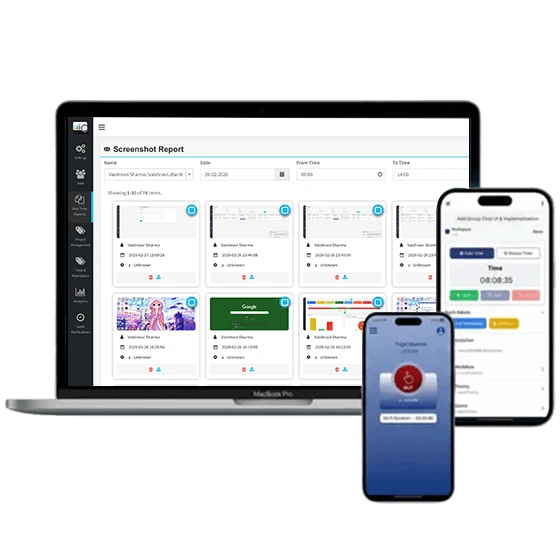
Time theft is one of the most common productivity challenges businesses face today. Whether employees work from the office, remotely, or in a hybrid environment, unproductive activities during paid work hours can negatively impact organizational performance. Activities such as excessive social media browsing, personal tasks, extended breaks, and non-work-related internet usage contribute to lost productivity and increased operational costs.
To address these challenges, many organizations are turning to screenshot monitoring solutions to gain better visibility into employee work activities and ensure that working hours are utilized effectively.
Understanding Time Theft in the Workplace
Time theft occurs when employees are compensated for time that is not spent on assigned work tasks. While some instances may be unintentional, repeated unproductive behavior can significantly affect team performance, project timelines, and business profitability.Traditional attendance systems can track when employees log in and log out, but they often fail to provide insights into how time is spent during working hours. This is where screenshot monitoring becomes an effective solution.
What Is Screenshot Monitoring?
Screenshot monitoring is a feature that automatically captures screenshots of an employee’s computer screen at scheduled intervals during work hours. These screenshots provide managers with visual records of ongoing tasks and work activities.
Unlike manual supervision, screenshot monitoring offers a non-intrusive way to verify productivity, identify workflow issues, and ensure accountability across teams. It helps organizations understand how employees spend their time while maintaining transparency in work processes.
How Screenshot Monitoring Reduces Time Theft
1. Increases Employee Accountability
When employees know that their work activities are being documented through screenshot captures, they are more likely to stay focused on job-related tasks. This increased accountability reduces the chances of employees spending excessive time on personal activities during work hours.
2. Identifies Productivity Gaps
Screenshot records provide managers with valuable insights into daily work patterns. Businesses can identify recurring distractions, inefficient workflows, and time-consuming activities that affect productivity.
3. Supports Remote Workforce Management
Managing remote teams can be challenging without visibility into daily work activities. Screenshot monitoring bridges this gap by allowing managers to monitor progress regardless of employee location.
4. Encourages Better Time Management
Employees often become more conscious of how they spend their working hours when monitoring systems are in place. As a result, they are more likely to prioritize tasks, minimize distractions, and maintain productivity throughout the day.Over time, this creates a culture of responsibility and effective time management across the organization.
5. Provides Evidence-Based Performance Evaluation
Instead of relying solely on assumptions or subjective observations, managers can use screenshot records as supporting evidence during performance reviews. This ensures fair evaluations based on actual work activity.
Combining Screenshot Monitoring with Employee Monitoring
While screenshot monitoring is highly effective on its own, it delivers even better results when combined with comprehensive employee monitoring tools.
Employee monitoring software can track application usage, website activity, active and idle time, productivity trends, and attendance records. Together, these features provide a complete overview of employee performance and help organizations make informed management decisions.
Why Businesses Choose DeskTrack
Organizations looking for a reliable productivity management solution often choose DeskTrack because it offers advanced screenshot monitoring and employee monitoring capabilities in a single platform.DeskTrack automatically captures screenshots, tracks application and website usage, monitors active and idle time, and generates detailed productivity reports. These features help businesses maintain transparency, improve accountability, and reduce time theft across remote, hybrid, and office-based teams.
Conclusion
Time theft can significantly impact business performance, employee productivity, and overall operational efficiency. Implementing screenshot monitoring helps organizations gain visibility into work activities, promote accountability, and encourage better time management practices.
When combined with employee monitoring solutions like DeskTrack, businesses can create a transparent and productive work environment where employees stay focused on their responsibilities. By leveraging the right monitoring tools, organizations can reduce time theft, improve workforce efficiency, and achieve their operational goals more effectively.
Categorii
Citeste mai mult
According to the latest report published by Data Bridge Market Research, the Asia-Pacific Industrial X-Ray Market CAGR Value The Asia-Pacific industrial X-ray market size was valued at USD 900.00 million in 2025 and is expected to reach USD 1,619.52 million by 2033, at a CAGR of 7.62% during the forecast period Winning Asia-Pacific...

Experience reliable, round-the-clock protection with intelligent CCTV camera systems featuring smart alerts and advanced monitoring. VRS Technologies LLC provides expert CCTV Camera Installation services in Dubai. Call +971-55-2093531 to learn more. Visit us: https://www.slideshare.net/slideshow/eyes-that-never-sleep-intelligent-cctv-camera-systems/285079531
Europe Anti-Aging Skincare Ingredients Market According to the latest report published by Data Bridge Market Research, the Europe Anti-Aging Skincare Ingredients Market The Europe Anti-Aging Skincare Ingredients Market size was valued at USD 415.80 million in 2024 and is expected to reach USD 589.05 million by 2032, at a CAGR of 4.45% during the forecast...
According to the latest report published by Data Bridge Market Research, the Cat Furniture and Scratchers Market The global cat furniture and scratchers market size was valued at USD 1.02 billion in 2025 and is expected to reach USD 1.39 billion by 2033, at a CAGR of12.30% during the forecast period The large scale Cat Furniture and Scratchers Market report evaluates CAGR value...
Entering the real estate market often feels like walking into a room where everyone is speaking a different language. You might be standing there with a steady job and a clear vision for your future, but you are haunted by the numbers on your credit report. Many people find themselves asking if a 600 credit score mortgage is a possibility in today's economy. The answer is a resounding yes, but...