


One Library vs Many Libraries: The Smart Way to Scale Email Records with Outlook–SharePoint Integration
Why Email Records Are a Governance Problem
Email is far more than day-to-day communication. Contracts, vendor negotiations, legal approvals, HR decisions, and financial confirmations all live inside email threads. For organisations using Microsoft 365, those records need to leave individual inboxes and land somewhere structured, searchable, and compliant.
That is the core promise of SharePoint Outlook integration — moving important email records from Outlook into SharePoint, Teams, or OneDrive where metadata, retention policies, and permissions can govern them properly.
But once emails start arriving in SharePoint, a critical architecture question immediately surfaces:
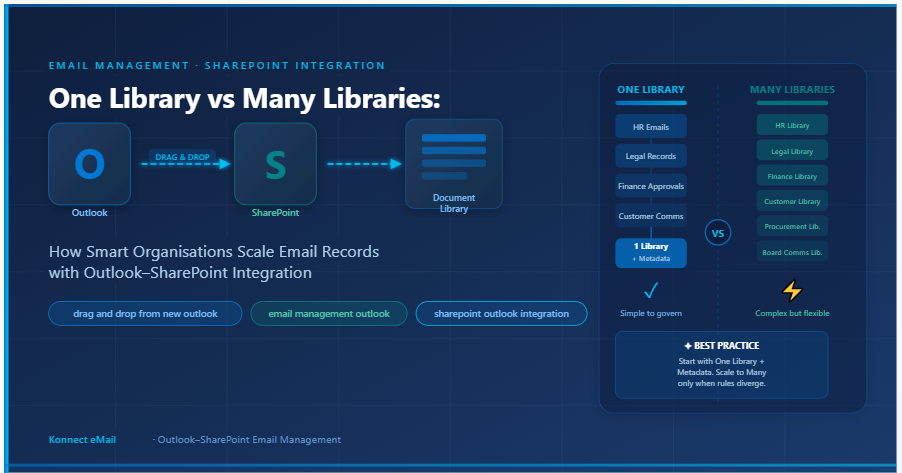
Should all email records live in one document library, or should organisations create separate libraries for each department, function, or record type?
The answer shapes everything: how easy it is for users to file emails, how administrators manage permissions, and how compliance teams retrieve records during an audit. Getting this decision right is the foundation of effective email management Outlook SharePoint architecture.
The Problem With Leaving Emails in Outlook
Microsoft Outlook is excellent for sending and receiving messages. It is not built for long-term records management. Three structural problems make inbox-only storage risky for organisations:
1. Email records belong to business processes, not mailboxes. A customer complaint belongs to a case file. A vendor email belongs to a procurement record. A contract negotiation belongs to a legal matter. When those emails stay only in individual inboxes, the organisation loses the ability to classify, retain, and retrieve them consistently.
2. Individual users are unreliable custodians. Employees leave, change roles, delete messages, or store information inconsistently. Records cannot depend on individual behaviour.
3. Compliance teams need retention certainty. Microsoft Purview supports retention policies across Exchange, SharePoint, OneDrive, and Teams. When emails are saved into SharePoint through proper SharePoint Outlook integration, they become governed assets — not personal files.
The shift from Outlook inbox to SharePoint library is not just about storage. It is about transforming individual communication into organisational records.
What Happens After Emails Land in SharePoint
When an email is saved from Outlook into a SharePoint document library — whether by drag and drop from New Outlook to SharePoint or through an add-in like Konnect eMail — it enters a structured environment where it can be tagged with metadata, placed under a retention label, and made searchable by anyone with the right permissions.
A SharePoint document library can store files, apply metadata columns, support filtered views, manage permissions, and connect with records management policies. What most organisations do not plan for is what happens as email volume grows: the library architecture question becomes urgent.
One Library: The Simplest Starting Point
A single-library model stores all email records in one place and separates them through metadata, views, folders, and retention labels rather than through separate libraries.
This approach is almost always the right starting point for organisations that are new to structured email management Outlook SharePoint workflows. Here is why:
-
Users always know where to file. There is no decision about which library an email belongs to.
-
Administrators manage one metadata model, one permission structure, one retention policy framework.
-
Compliance teams have a single place to search and review records.
-
Governance is consistent. There are no gaps between libraries where records might fall through.
A customer support team, for example, can save all customer emails into one SharePoint library. Each record is tagged with customer name, ticket number, issue type, date received, and status. Users filter by ticket number or customer instead of navigating multiple libraries. The metadata does the organising work — the library itself stays simple.
This model is particularly powerful when combined with drag and drop from New Outlook to SharePoint. Users working in the New Outlook interface can drag emails directly into a configured SharePoint library, with email metadata captured automatically on save.
The Role of Metadata — What Makes One Library Practical
Without metadata, a single library becomes a flat container of files. With metadata, it becomes a searchable records system.
Common metadata fields for email records include:
-
Date received and date sent
-
Sender and recipient
-
Department or business unit
-
Matter number, case number, or project code
-
Record type (approval, complaint, contract, internal)
-
Confidentiality level
-
Retention label
-
Status (open, resolved, escalated, archived)
Indexed columns are essential at scale. When users filter by indexed fields such as date, case ID, or department, SharePoint returns results efficiently rather than scanning the entire library. This is the performance foundation of any large-scale SharePoint Outlook integration deployment.
When Multiple Libraries Are the Right Call
Multiple libraries become the better choice when email records have genuinely different ownership, different security boundaries, different metadata schemas, or different retention requirements.
Practical examples of functions that typically warrant their own libraries:
-
HR records — employee ID, grievance type, confidentiality level, legal hold
-
Legal matter correspondence — matter number, jurisdiction, outside counsel, legal hold status
-
Finance approvals — purchase order, cost centre, approval status, financial year
-
Procurement records — vendor ID, contract phase, tender reference
-
Board communications — board meeting date, director names, resolution reference
Each function has its own operational logic. HR compliance is not the same as legal compliance. Procurement metadata is not the same as finance metadata. Creating separate libraries for each gives administrators clean permission boundaries and allows each function to manage records according to its own rules.
The risk in this model is fragmentation. If too many libraries are created too early, users lose clarity about where emails should go. Search becomes divided. Configuration is duplicated. Metadata becomes inconsistent across libraries. Multiple libraries should be created only when business logic genuinely demands it — not for convenience or organisational tidiness.
Four Practical Architecture Patterns
Real deployments typically fall into one of four patterns, each suited to a different stage of organisational maturity:
Pattern 1 — One Library, Many Views Store all records in one library. Create filtered views for HR, finance, legal, and support. Ideal for small organisations or those just starting with email management Outlook SharePoint workflows.
Pattern 2 — One Library, Metadata-Driven Partitioning Use fields like department, record type, and retention class to logically separate records within a single library. Best when administrators want a single source of truth with no structural complexity.
Pattern 3 — Multiple Libraries by Function Create separate libraries for HR, finance, legal, and operations. Best when each function has distinct compliance rules and the risk of mixing record types is high. This model requires careful governance to prevent fragmentation.
Pattern 4 — One Parent Repository with Sub-Libraries A central records hub with separate libraries beneath it. Preserves central oversight while allowing operational separation. This is the most mature architecture and suits large organisations with formal records management programmes.
The Most Common Mistakes Organisations Make
Teams implementing SharePoint email records for the first time consistently make the same set of mistakes:
Creating too many libraries too early. This fragments records before users have settled into filing habits. Start simple.
Using one library without metadata. A library without columns is not a records system — it is cloud storage with a SharePoint logo. Metadata is not optional; it is the foundation.
Ignoring column indexing. Libraries that work fine at 1,000 records can slow dramatically at 50,000. Index the columns users filter by most often from the beginning.
Misaligning permissions and structure. Granting access at the folder level inside a library creates permission complexity that is hard to audit and maintain. Permissions should align with library boundaries wherever possible.
Not capturing email metadata on save. When teams use manual drag and drop from New Outlook to SharePoint without a tool that captures From, To, CC, Subject, and Date automatically, those fields must be entered manually — which users skip, leaving untagged records that nobody can find.
The Recommended Starting Architecture
The simplest, most scalable approach is to start with one library and build it properly.
Define a metadata model that reflects how your team actually searches for records — not how the organisation chart is drawn. Apply retention labels at the library level where possible. Create views for common search patterns. Index the columns users filter most frequently.
Introduce multiple libraries only when a business function has clearly different compliance requirements, different security boundaries, or a metadata model that cannot be merged with the main library without creating confusion.
This approach keeps the system understandable for users, manageable for administrators, and defensible during audits.
How Konnect eMail Supports This Architecture
Konnect eMail is built specifically to make SharePoint Outlook integration reliable and scalable. Users can save emails and attachments from Outlook — including via drag and drop from New Outlook to SharePoint — directly into configured SharePoint libraries, with email metadata captured automatically as library columns.
This removes the manual tagging burden from users, ensures that From, To, CC, Subject, and Sent/Received dates are always captured consistently, and makes the one-library model genuinely practical at scale.
Konnect eMail also supports Microsoft Teams, OneDrive, and other connected platforms — giving organisations a consistent approach to email management Outlook SharePoint workflows across their entire Microsoft 365 environment.
For organisations ready to build a more searchable, compliant, and scalable email records system, Konnect eMail provides the layer between Outlook and SharePoint that makes the architecture work in practice.
الأقسام
إقرأ المزيد
Executive Summary Brazil Hearing Aids Market Research: Share and Size Intelligence Data Bridge Market Research analyses that the Brazil hearing aids market which was USD 580.00 million in 2022, would rocket up to USD 980.00 million by 2030, and is expected to undergo a CAGR of 6.8% during the forecast period. Market research studies stated in this Brazil Hearing Aids Market...

Schools today face a lot of competition when it comes to getting students. Parents and students usually search online before choosing a school. This is why digital advertising is a part of the admission process. Many schools now use services that help them get students in Pune. These services make sure the schools get quality inquiries and improve their admission campaigns. When schools use the...

Business signage plays a crucial role in shaping brand identity, attracting customers, and communicating professionalism. Whether it is a storefront sign, outdoor billboard, office nameplate, or illuminated display, the material used determines how well the signage performs over time. A visually appealing design alone is not enough; the signage must also withstand environmental challenges such...

The upcoming Comic-Con in San Diego will host the exclusive world premiere of the highly anticipated series 'Terra Nova'. This prehistoric drama, produced by Steven Spielberg and Peter Chernin, has been kept largely secret, with only a trailer and select screenings revealed so far. The unveiling is part of a massive presentation by 20th Century Fox Television, which is bringing 13 series to the...

" According to the latest report published by Data Bridge Market Research, the North America Multiple Hereditary Exostosis Market The North America multiple hereditary exostosis market size was valued at USD 51.36 million in 2024 and is expected to reach USD 65.57 million by 2032, at a CAGR of 3.10% during the forecast period The winning North America...