Choosing the Right RMM Software for Windows Environments

Why RMM Selection Decisions Matter Long-Term
The selection of RMM software for a Windows environment is a consequential long-term decision because the management platform becomes deeply embedded in IT operational workflows, data infrastructure, and staff expertise over time, making platform replacement increasingly disruptive as adoption matures. Organizations that make initial RMM selections based on surface feature comparisons or price considerations without evaluating the platform's suitability for their specific environment, scale requirements, and operational context often find themselves constrained by their selection as their needs evolve. A thoughtful selection process that evaluates RMM platforms against clearly defined requirements reduces the likelihood of selection regret and the organizational cost of platform replacement.
Defining Your Windows RMM Requirements Before Evaluating Options
Effective RMM software selection for Windows environments begins with clear definition of the requirements the platform must satisfy before any vendor evaluation begins. Requirements definition should cover the scale of the managed Windows environment — device counts, geographic distribution, network architecture — that the platform must support. It should identify the specific management functions the organization needs — patch management, remote access, monitoring, automation, reporting — and the specific capabilities within each function that are most important. It should address integration requirements with existing tools — ticketing systems, PSA platforms, security tools, identity infrastructure — that the RMM platform must support. And it should honestly assess the internal IT capability available to implement and operate the platform, since platforms that require significant configuration expertise to deploy effectively may not be suitable for organizations without that expertise internally.
Evaluating Monitoring and Alerting Depth
The monitoring and alerting capabilities of Windows RMM platforms vary significantly in the breadth of metrics they monitor, the granularity of alerting configuration they support, and the quality of the alerting noise reduction that determines whether IT staff can rely on alerts to surface genuine issues without alert fatigue from excessive false positives. Evaluating monitoring depth requires testing platforms against specific monitoring scenarios relevant to the Windows environment being managed — verifying that specific metrics important to the organization can be monitored at required frequencies and granularity, that alert thresholds can be configured with the specificity needed to detect relevant conditions, and that alert delivery reaches the right people through the preferred communication channels with the appropriate urgency classification.
Assessing Patch Management Completeness
Patch management capability evaluation for Windows RMM software should cover both Windows OS patch management and third-party application patch management, as comprehensive patch coverage requires both. Windows OS patch management evaluation should examine the level of control the platform provides over which updates are deployed, the scheduling mechanisms available for deployment timing, the ring-based deployment staging support for controlled rollout, and the compliance reporting that enables visibility into patch status across the managed fleet. Third-party application patch management evaluation should assess the breadth of the application catalog — how many applications the platform can patch automatically — the update detection latency — how quickly new application updates are available for deployment after vendor release — and the application-specific deployment control available for organizations that need to test or approve application updates before deployment.
Remote Access Security and Performance
Remote access quality is a critical RMM evaluation criterion because the remote access capabilities the platform provides will be used daily by IT staff for troubleshooting and administration, and its performance and security characteristics directly affect both staff productivity and organizational security posture. Remote access performance evaluation should assess connection initiation speed, session responsiveness under typical network conditions, and reliability of connections across the varied network environments that managed devices may be located in. Security evaluation should examine authentication requirements for remote access sessions, encryption standards applied to session traffic, session recording capabilities for administrative access to sensitive systems, and access control mechanisms that limit which technicians can access which devices.
Total Cost of Ownership Analysis
RMM software selection decisions should be based on honest total cost of ownership analysis that considers all cost components over the expected deployment lifetime rather than only the initial licensing cost. Implementation costs including configuration, testing, and training should be estimated realistically based on the platform's implementation complexity and the organization's internal resources available for implementation. Ongoing operational costs including staff time for platform administration, integration maintenance, and workflow management should be factored into the comparison. Scaling costs as the managed device population grows should be modeled for platforms with per-device pricing structures. Vendor support costs for the level of support required should be included. This comprehensive cost analysis often reveals significant cost differences between platforms that appear similar on headline licensing price comparisons. Find professional RMM Software Windows solutions that deliver the capabilities your environment requires at appropriate total cost.
Categorie
Leggi tutto
The demand for used iPhones has increased significantly as more buyers look for premium Apple devices at affordable prices. Whether you are an individual customer, a retailer, or a business purchasing devices in bulk, choosing the right supplier plays a major role in ensuring quality, reliability, and long-term value. While the market offers numerous options, not every seller follows...

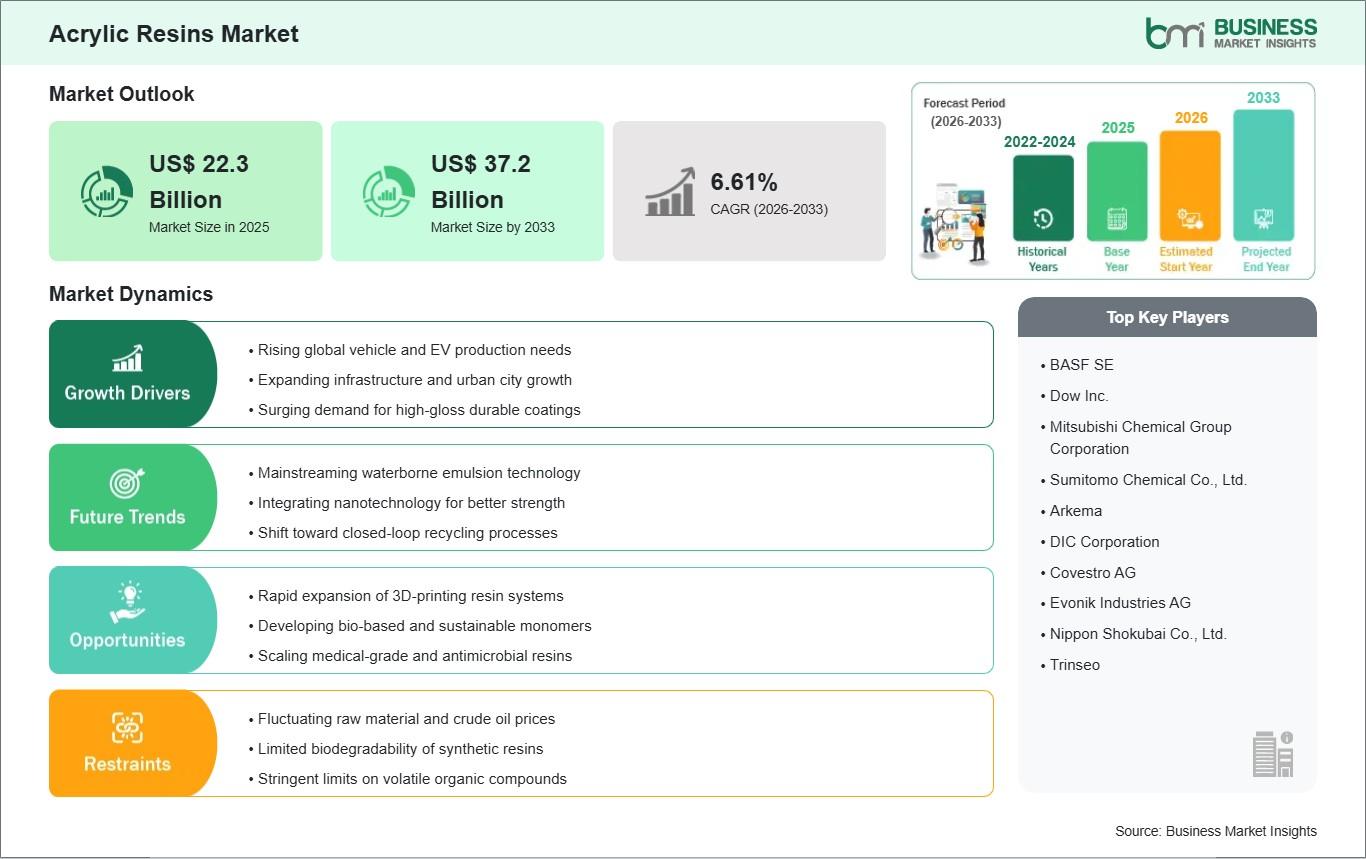
The Acrylic Resins Market is experiencing dynamic global growth, driven by an escalating demand for high-performance, durable, and weather-resistant materials across a multitude of heavy industries. Essential to the formulation of modern paints, industrial coatings, adhesives, and sealants, acrylic resins offer unparalleled advantages, including exceptional UV resistance, superior gloss...
Furniture Cleaning: Furniture plays an important role in every home, office, hotel, and commercial property. Comfortable sofas, elegant chairs, stylish carpets, and well-maintained upholstery create a welcoming environment for guests, customers, and family members. Over time, however, furniture naturally collects dust, stains, bacteria, allergens, and unpleasant odors that affect both...

In a city as competitive and fast-moving as Sydney, having “just a website” is no longer enough. You need a digital presence that demands attention, earns trust, and drives action—all within seconds. This is where i-HiddenTalent, a results-driven Web development agency in sydney, steps in and completely changes the game. If you feel your current website is underperforming,...

Discover top industry trends driving demand for carbide drill bits, including CNC machining, precision engineering, and cost-efficient drilling solutions. Why Carbide Drill Bits Are in High Demand Across Industries The manufacturing sector is evolving at an unprecedented pace, driven by technological advancements, automation, and the need for...