


Key Features Every Enterprise Mobile App Should Include
Enterprise mobile apps are no longer optional tools. Today, many organizations rely on them to manage operations, support employees, and make faster decisions. However, building an app without the right features can create more problems than it solves. Poor performance, low adoption, and security risks often come from weak planning.
That is why feature selection is critical in enterprise mobile app development. An enterprise app must do more than look good. It should support business workflows, protect data, and scale as the organization grows. In addition, it must be easy for employees to use, even if they are not technical. Let’s discuss key features every enterprise mobile app should include.
Understanding Enterprise Mobile App Features
Before looking at individual features, it helps to understand what makes enterprise apps different. Unlike consumer apps, enterprise mobile apps are built for internal users, partners, or large customer groups. They often handle sensitive data and connect to multiple business systems.
Because of this, features must support stability, control, and long-term use. Some features are essential for almost every enterprise app, while others depend on business goals and industry needs. Still, there are core features that most organizations cannot afford to ignore.
Strong Security and Data Protection Features
Security is one of the most critical areas in enterprise mobile app development. Enterprise apps often store or process confidential business and user data. Without proper safeguards, even a small vulnerability can lead to serious consequences.
User Authentication and Access Control
Every enterprise mobile app should control who can access the system and what they can do. Strong authentication ensures that only authorized users can log in. This often includes passwords, biometric authentication, or multi-factor authentication.
In addition, role-based access control is essential. Not every user needs access to the same data or features. For example, managers, employees, and administrators should have different permissions. This reduces risk and helps users focus on relevant tasks.
Data Encryption and Secure Storage
Data security does not stop at login. Enterprise apps must protect data during transfer and storage. Encryption ensures that even if data is intercepted, it cannot be easily read or misused.
Secure storage practices also help protect sensitive information on devices. This is especially important when employees use mobile phones or tablets outside the office.
Compliance and Regulatory Support
Many organizations must follow industry regulations and data protection laws. Enterprise mobile apps should support compliance by keeping logs, audit trails, and access records. These features help businesses meet legal requirements and maintain accountability.
Scalability and Performance Capabilities
An enterprise app should work well today and continue working as the organization grows. Performance and scalability features ensure the app can handle an increasing user base, data volume, and workloads.
Ability to Handle Growing User Loads
As companies expand, more employees and teams may rely on the app. The system should be able to handle this growth without slowing down or crashing. Poor scalability can disrupt workflows and reduce trust in the app. Planning for growth early helps avoid costly changes later.
Optimized App Performance
Speed and responsiveness matter, even for internal apps. Slow loading screens and delayed actions frustrate users and reduce productivity. Performance optimization ensures that the app runs smoothly across devices and network conditions. This includes efficient data handling, optimized code, and proper caching where needed.
Cloud Integration for Scalability
Many enterprise apps use cloud infrastructure to support scaling. Cloud integration enables organizations to scale resources in response to demand. It also improves reliability and simplifies maintenance. In enterprise mobile app development, cloud support often plays a key role in future-proofing the solution.
Seamless Integration with Existing Systems
Enterprise mobile apps rarely operate on their own. Instead, they connect to existing business systems to share data and automate processes.
Integration with Enterprise Software
Most organizations already use tools such as ERP, CRM, HR, or accounting systems. A strong enterprise app should integrate with these platforms to provide real-time data access.
This reduces manual data entry, lowers error rates, and improves workflow efficiency. Employees can complete tasks from one interface instead of switching between multiple systems.
API and Third-Party Service Support
APIs allow enterprise apps to communicate with internal and external services. This flexibility supports future integrations and helps the app adapt to changing business needs.
For example, integrations with payment systems, analytics tools, or communication platforms can add value without requiring the rebuilding of core features.
User-Friendly Interface and Experience
Even the most powerful app will fail if users find it hard to use. User experience plays a major role in enterprise mobile app adoption.
Intuitive Navigation and Layout
Enterprise apps should be simple and clear. Users should quickly understand where to go and what to do. Clear menus, readable text, and logical workflows reduce confusion and training time. When design supports user behavior, employees work faster and make fewer mistakes.
Consistent Experience Across Devices
Many users access enterprise apps on different devices. A consistent experience across phones and tablets helps users switch devices without relearning the interface. Consistency also supports brand standards and improves usability.
Accessibility Considerations
Accessibility ensures that users with different abilities can use the app effectively. This includes readable text, clear contrast, and support for assistive technologies. Accessible design benefits everyone and reflects responsible development practices.
Offline Access and Sync Capabilities
Not all users have constant internet access. Enterprise apps should support offline use where possible.
Offline Data Access
Offline access allows users to view or enter data without an active connection. This is especially useful for field teams, remote workers, and traveling employees. Offline features ensure work continues even in poor network conditions.
Automatic Data Synchronization
Once connectivity is restored, the app should sync data automatically. This prevents data loss and keeps systems up to date. Reliable synchronization reduces errors and improves trust in the app.
Customization and Role-Based Features
Every organization has unique workflows. Customization allows enterprise apps to adapt to these differences.
Role-Specific Dashboards
Dashboards should show relevant information based on user roles. For example, managers may need performance metrics, while employees may focus on daily tasks. Role-specific views reduce clutter and improve focus.
Configurable Workflows
Configurable workflows allow businesses to adjust processes without major code changes. This flexibility supports evolving needs and reduces dependency on development teams. In enterprise mobile app development, adaptability is a long-term advantage.
Analytics and Reporting Tools
Data-driven decisions are critical for modern organizations. Enterprise apps should support analytics and reporting features.
Real-Time Data Insights
Real-time insights help teams monitor performance and respond quickly to issues. Dashboards can show key metrics, usage trends, and operational data. These insights support better planning and faster decision-making.
Custom Reports and Dashboards
Different teams need different reports. Custom reporting allows users to focus on relevant data and export it for further analysis. Clear reporting improves transparency and accountability.
Push Notifications and Alerts
Timely communication keeps users informed and engaged.
Real-Time Notifications
Push notifications alert users about updates, tasks, or system changes. These alerts help teams respond faster and stay aligned. However, notifications should be meaningful and relevant.
Notification Management
Users should be able to control what notifications they receive. This prevents overload and improves focus. Good notification management supports productivity instead of disrupting it.
The Final Word
Enterprise mobile apps succeed when features align with business goals. While not every app needs every feature, security, performance, usability, and integration should always be priorities.
Enterprise mobile app development is about creating tools that support people, processes, and growth. By focusing on essential features and planning for the future, organizations can build apps that deliver long-term value.
Categorias
Leia mais
Industrial and commercial construction has changed significantly over the years. Businesses now look for building materials that offer durability, cost efficiency, and long-term performance. Doors and windows are not just functional components of a building; they also contribute to structural strength, safety, and operational efficiency. This is why steel-based construction products are gaining...

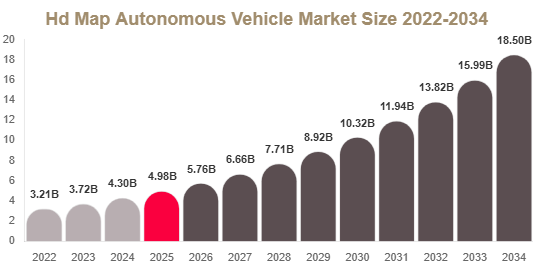
HD Map Autonomous Vehicle Market The HD Map Autonomous Vehicle Market is experiencing rapid growth due to increasing advancements in autonomous driving technologies, rising investments in connected mobility, and growing demand for high-precision navigation systems. High-definition (HD) maps play a critical role in autonomous vehicles by providing detailed road information, lane-level accuracy,...
A strong ABM strategy relies on meaningful engagement with high value accounts. One of the most effective ways to achieve this is through owned media channels that allow organizations to control how their brand communicates with target audiences. These channels help businesses deliver consistent messaging, build authority, and nurture relationships with decision makers throughout the buyer...

A new growth forecast report titled Abdominal Aortic Aneurysm (AAA) Repair Devices Market Size, Share, Trend, Industry Analysis Report By Product Type (Endovascular Stent Graft System, Synthetic Graft System, Others), By Site, By End Use, By Region – Market Forecast, 2025–2034 introduced by Polaris Market Research represents conclusive data on the overall market. It majorly targets...

Illuminating Luxury: How High-End Lighting Is Redefining Interior Design, Sustainability, and Smart Living Light has always been more than a utility. In the hands of skilled designers and craftspeople, it becomes architecture, emotion, and identity a statement about who lives or works in a space and what they value. The global high-end lighting industry sits at the extraordinary intersection of...