


Fluent Bit: Building a Smarter Logging Pipeline That Actually Scales
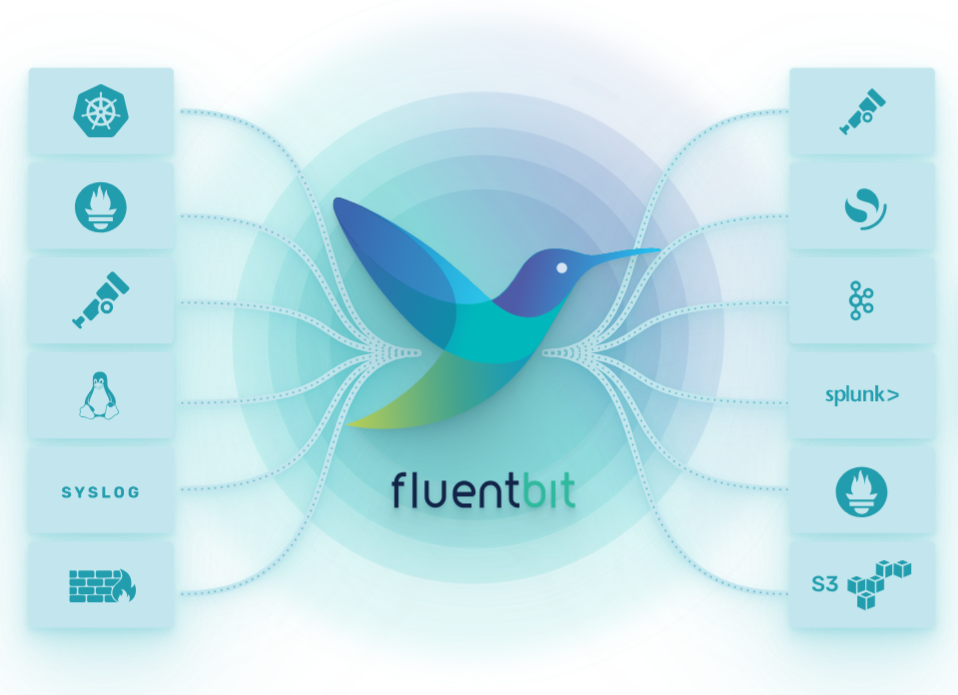
If you’ve ever dealt with messy logs, missing data, or systems slowing down under pressure, you already know logging isn’t just a backend task, it’s the heartbeat of modern infrastructure. And that’s exactly where Fluent Bit shines.
Lightweight, powerful, and surprisingly flexible, Fluent Bit has become a go-to choice for developers and DevOps teams who want efficient log processing without the overhead. But here’s the thing: just installing Fluent Bit isn’t enough. The real magic happens when you optimize it properly.
In this guide, we’re diving into how to build a smarter, scalable logging pipeline using Fluent Bit one that keeps your systems fast, your logs reliable, and your sanity intact.
Why Fluent Bit is a Game-Changer for Modern Logging
Fluent Bit isn’t just another log forwarder it’s designed for high-performance environments where efficiency matters. Whether you’re working with containers, microservices, or large-scale cloud deployments, it handles data collection and forwarding with minimal resource usage.
What makes it truly stand out is its modular architecture. You can plug in different inputs, filters, and outputs to create a pipeline tailored exactly to your needs. It’s like building your own logging ecosystem, piece by piece.
If you’re exploring observability as a whole, pairing Fluent Bit with OpenTelemetry creates a powerful combination. You can check out Fluent Bit OpenTelemetry for Unified Observability to see how they work together seamlessly.
Designing a Logging Pipeline That Doesn’t Break
A good logging pipeline isn’t just about collecting data it’s about ensuring that data flows smoothly, even under stress. This is where thoughtful design comes into play.
Start by identifying your data sources. Are you collecting logs from containers, system services, or applications? Each source may require a different input plugin in Fluent Bit.
Next, think about filtering and processing. Not all logs are equally important, so adding filters helps reduce noise and focus on what actually matters. This keeps your pipeline efficient and prevents unnecessary overload.
Finally, choose your output destinations wisely. Whether it’s Elasticsearch, a cloud logging service, or a custom endpoint, make sure it can handle the volume you’re sending.
Memory vs Filesystem Buffering: What You Should Choose
One of the most important decisions in Fluent Bit is how you handle buffering. This directly impacts performance, reliability, and resource usage.
Memory buffering is fast and efficient, making it ideal for high-speed environments where latency matters. However, it comes with a risk if your system crashes, you could lose data.
Filesystem buffering, on the other hand, provides durability. Logs are stored on disk before being forwarded, which means they’re safer during failures. The trade-off is slightly slower performance.
Choosing between the two depends on your priorities. If you want a deeper dive into this topic, check out Fluent Bit Buffer Management: Memory vs Filesystem for a detailed comparison.
Avoiding Common Logging Mistakes
Even with a powerful tool like Fluent Bit, mistakes can happen and they can cost you in performance and reliability.
One common issue is overloading the pipeline with unnecessary logs. More data isn’t always better. Filtering out irrelevant information keeps your system lean and efficient.
Another mistake is ignoring resource limits. Fluent Bit is lightweight, but it still needs proper configuration to avoid bottlenecks. Monitoring CPU and memory usage helps you stay ahead of potential issues.
Interestingly, this concept applies beyond logging too. For example, in computational simulations, avoiding configuration mistakes is just as critical. You can explore similar pitfalls in Mistakes to Avoid ANSYS CFX for CFD Simulations to see how optimization plays a role across different domains.
Scaling Fluent Bit for High-Traffic Environments
As your system grows, your logging pipeline needs to grow with it. Scaling Fluent Bit isn’t just about adding more resources it’s about optimizing how data flows.
Start by distributing workloads. Running multiple Fluent Bit instances can help balance the load and prevent single points of failure.
You should also consider batching logs. Sending data in chunks rather than individually reduces overhead and improves performance.
Another key strategy is monitoring. Keep an eye on metrics like throughput, latency, and error rates. This gives you insights into how your pipeline is performing and where improvements are needed.
Integrating Fluent Bit with Observability Tools
Logging is just one piece of the observability puzzle. To get a complete picture of your system, you need to integrate logs with metrics and traces.
Fluent Bit works beautifully with tools like OpenTelemetry, allowing you to unify your observability stack. This means you can correlate logs with performance metrics and trace requests across your system.
The result? Faster debugging, better insights, and a more proactive approach to system management.
Tips for a Smooth and Efficient Setup
Getting the most out of Fluent Bit doesn’t require complicated setups just a few smart practices.
Keep your configuration files organized and well-documented. This makes it easier to troubleshoot and scale your setup later.
Regularly update Fluent Bit to benefit from performance improvements and new features. Staying current ensures compatibility with modern tools and platforms.
Lastly, test your pipeline under load. Simulating real-world conditions helps you identify weak points before they become real problems.
Final Thoughts
Fluent Bit is more than just a logging tool it’s a foundation for building reliable, scalable, and efficient data pipelines. When configured thoughtfully, it can handle massive workloads while keeping your systems responsive.
From choosing the right buffering strategy to integrating with observability tools, every decision you make shapes how well your pipeline performs.
Категории
Больше
The demand for skilled technology professionals continues to grow across India, creating excellent opportunities for students, graduates, and working professionals looking to build rewarding careers. However, selecting the right training institute can significantly influence your learning experience and employability. If you're searching for the best computer institute in Trivandrum, it's...

Quadrant Knowledge Solutions reveals that the global P&C Core Insurance Platform market is projected to register a compound annual growth rate (CAGR) of 10.60% through 2030, driven by increasing digital transformation initiatives, evolving customer expectations, and the growing need for insurers to modernize legacy systems. As property and casualty (P&C) insurers navigate an...

Paul Nicholas has enjoyed a long and diverse career in the entertainment industry. From music and television to stage performances and acting roles, he built a reputation as a versatile performer capable of succeeding across multiple fields. His ability to remain relevant through changing entertainment trends has contributed significantly to his financial stability and professional...

The Total Organic Carbon (TOC) Analyzer market is growing steadily, driven by increasing demand for water quality monitoring, stringent environmental regulations, and rising awareness about water purity across industries. According to Business Market Insights, the market was valued at USD 1.5 billion in 2025 and is expected to reach USD 2.8 billion by 2033, registering...
Chlorine trifluoride is a highly reactive interhalogen compound extensively used in specialized industrial applications, including semiconductor manufacturing, nuclear fuel processing, and chemical synthesis. Known for its exceptional fluorinating properties, chlorine trifluoride plays a crucial role in cleaning chemical vapor deposition chambers and supporting advanced electronics production....